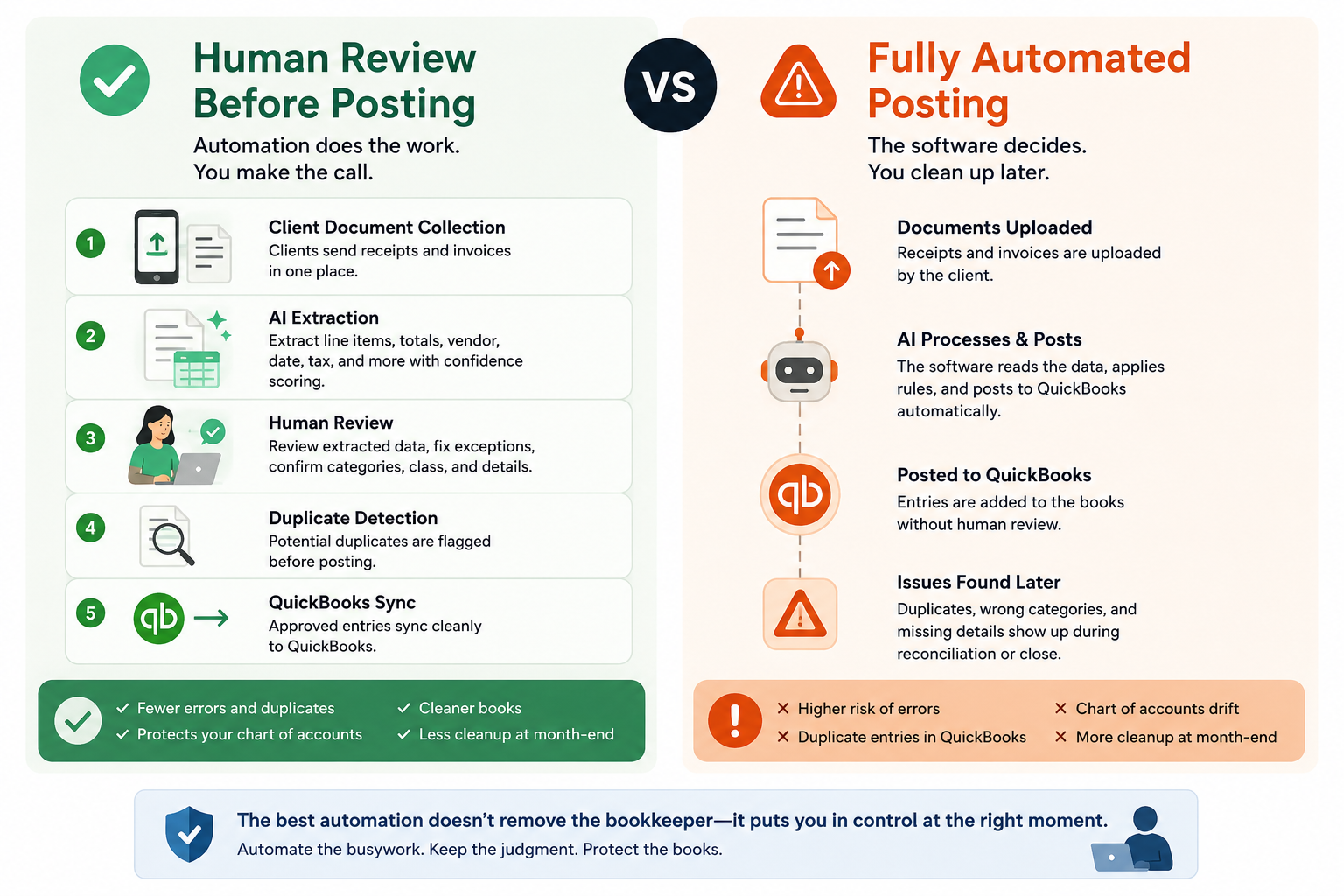
Human Review vs Fully Automated Bookkeeping
12 min read
This article is for bookkeepers and small CPA firms managing 5–100 QuickBooks clients.
The question is simple: should bookkeeping automation post transactions without review, or should a human review them first?
For most bookkeeping firms, human review is the safer model. Fully automated bookkeeping can reduce clicks, but review-before-post protects the chart of accounts, catches client mistakes, prevents duplicates, and keeps month-end close from turning into cleanup work.
That is the difference between automation that helps a bookkeeper and automation that creates another mess to fix.
If you are comparing tools, start with the workflow. A good QuickBooks receipt scanner should not just extract data. It should help you collect documents, review the fields that matter, catch duplicates before posting, and sync clean entries into QuickBooks.
The Real Question Is Not "Manual or Automated?"
Bookkeepers do not need more manual data entry.
They also do not need software that blindly posts questionable transactions into QuickBooks.
The real question is:
Where should automation stop, and where should the bookkeeper stay in control?
That is where a lot of "fully automated bookkeeping" messaging falls apart.
A receipt or vendor invoice is not just a document. It affects:
- The chart of accounts
- Vendor records
- Job costing
- Sales tax treatment
- Billable expenses
- Class and location tracking
- Month-end reconciliation
- Client financials
- Cleanup risk
A tool can read a receipt. It can suggest fields. It can match vendors. It can sync to QuickBooks.
But the bookkeeper is still responsible for whether the entry is right.
That is why review-before-post is not a weakness. It is the control point.
Human Review vs Fully Automated Bookkeeping: The Practical Difference
| Area | Human review before posting | Fully automated posting |
|---|---|---|
| Data entry speed | Automation extracts fields, bookkeeper reviews exceptions | Fastest when documents are clean and rules are simple |
| Accuracy control | Bookkeeper confirms vendor, category, tax, class, and client context | Software posts based on rules, OCR, or prior patterns |
| Duplicate risk | Duplicates can be caught before QuickBooks sync | Duplicates may enter QuickBooks and require cleanup |
| Chart of accounts control | Bookkeeper protects COA consistency | COA can drift if rules are wrong or client behavior changes |
| Client document issues | Missing, blurry, partial, or wrong receipts can be stopped | Bad documents may still create bad entries |
| Month-end close impact | Fewer cleanup items during close | Faster posting, but cleanup risk moves to reconciliation |
| Best fit | Bookkeeping firms serving multiple clients | Simple, repetitive workflows with low risk and strong rules |
Why "Fully Automated" Sounds Better Than It Works
Fully automated bookkeeping is attractive because it promises no touching, no reviewing, no posting, and no chasing.
That sounds great until the client sends:
- A photo of half a receipt
- A personal purchase on the business card
- Two copies of the same invoice
- A vendor invoice with multiple expense categories
- A construction supply receipt that needs job costing
- A restaurant invoice with food, paper goods, alcohol, and delivery fees
- A reimbursement receipt that should not hit the wrong account
- A vendor name that QuickBooks already has under a slightly different spelling
Those are not edge cases for bookkeepers.
That is Tuesday.
The problem is not that automation fails. The problem is that bookkeeping data has context. A tool may know what is on the document. The bookkeeper knows what should happen in the books.
What Human Review Actually Means
Human review does not mean retyping every receipt.
It does not mean slow.
It does not mean "manual bookkeeping with extra software."
In a modern workflow, human review means the software does the heavy lift first:
- Collect the client documents.
- Extract the vendor, date, total, line items, tax, and other fields.
- Show confidence scores or flags where the data may need attention.
- Let the bookkeeper review, correct, approve, or reject.
- Check for duplicates before the entry is pushed.
- Sync clean data into QuickBooks.
That is very different from keying every field by hand.
The bookkeeper is not doing the data entry. She is controlling the posting decision.
That is the right division of labor.
Why Review-Before-Post Matters for QuickBooks Firms
QuickBooks is where the financial record lives.
If automation pushes bad entries into QuickBooks, the problem does not stay in the receipt tool. It shows up later in:
- Bank feeds
- Reconciliation
- Vendor balances
- Expense reports
- Job profitability
- P&L review
- Sales tax review
- Month-end close
The more clients a firm manages, the more expensive bad posting becomes.
One bad receipt is small.
A bad posting pattern across 30 clients is not.
That is why review-before-post matters. It keeps the bookkeeper in control before the damage reaches the ledger.
The Chart of Accounts Is Not Optional
Fully automated tools often rely on rules.
Rules are useful. But rules can also create quiet errors.
A vendor might usually go to Meals. But one invoice from the same vendor might include supplies. A Home Depot receipt might be materials for one client, repairs for another, and tools for a third. A restaurant vendor invoice might need multiple categories instead of one summary expense.
If the tool only posts based on vendor history, the entry can look clean and still be wrong.
Line-item review helps here.
When the software extracts line items, the bookkeeper can see what was purchased and decide whether the split matters. That is especially important for construction, restaurants, ecommerce, hospitality, and any client where one receipt can touch more than one account.
This is why receipt-to-QuickBooks automation should not stop at the total. The details often matter.
Duplicate Detection Belongs Before the Push
Duplicates are one of the most painful automation problems.
They usually happen because clients send the same document more than once:
- Upload link
- Texted photo
- Forwarded vendor invoice
- Month-end catch-up folder
- Card statement support
The client thinks they are helping. The bookkeeper gets duplicate entries.
If duplicate detection happens after sync, the cleanup is already inside QuickBooks.
A better workflow checks for duplicates at the push gate. That means the software flags possible duplicates before the entry is posted to QuickBooks.
That protects the ledger.
It also protects the bookkeeper's time during close.
Fully Automated Bookkeeping Moves Work Downstream
The biggest risk with full automation is not that work disappears.
It is that work moves.
Instead of reviewing documents before posting, the bookkeeper reviews errors after they hit QuickBooks.
That means cleanup may happen during:
- Reconciliation
- Financial review
- Client questions
- Tax prep support
- Month-end close
- Year-end cleanup
That is the worst time to find basic posting problems.
Review-before-post catches problems while the document is still in front of you. The receipt, invoice, extracted fields, confidence flags, and QuickBooks destination are all visible at the point of decision.
That is faster than detective work later.
When Fully Automated Bookkeeping Is the Better Choice
Fully automated bookkeeping can be the better choice when the work is simple, repetitive, and low risk.
It may fit if:
- The client has very few vendors
- The chart of accounts is simple
- Transactions repeat the same way every month
- There is no job costing, class tracking, or location tracking
- Line items do not matter
- The firm is comfortable reviewing results after posting
- The cost of an occasional mistake is low
For example, a small client with a few recurring software subscriptions may not need much review. A simple bank rule may be enough.
But that is not the same as running receipt and invoice automation across dozens of QuickBooks clients.
The more clients, vendors, documents, and exceptions you manage, the more important the review step becomes.
A Better Workflow: Automate the Work, Not the Judgment
Here is the workflow most bookkeeping firms should want.
| Step | What automation should do | What the bookkeeper should control |
|---|---|---|
| 1. Client document collection | Give clients one clear way to send receipts and invoices | Decide what is missing and what needs follow-up |
| 2. AI extraction | Pull vendor, date, total, tax, and line items | Review low-confidence fields and client-specific context |
| 3. Human review | Surface the extracted data in a review queue | Approve, correct, reject, or hold |
| 4. Duplicate detection | Flag likely duplicates before posting | Decide whether to merge, ignore, or post |
| 5. QuickBooks sync | Push approved entries into QuickBooks | Keep control of what reaches the ledger |
This is the ScribeosAI philosophy.
Do not make bookkeepers retype receipts. Do not let software blindly post everything either.
Use automation to remove the repetitive work. Keep the human review step where professional judgment matters.
Where ScribeosAI Fits
ScribeosAI is built for bookkeepers and small CPA firms that use QuickBooks.
The workflow is:
client document collection → AI extraction with line items and confidence scoring → human review → duplicate detection → QuickBooks sync
That matters because most firms do not need "set it and forget it" bookkeeping.
They need faster throughput without giving up control.
ScribeosAI helps with the work bookkeepers actually feel every month:
- Chasing clients for documents
- Typing receipt and invoice data
- Reviewing messy submissions
- Splitting line items
- Catching duplicates
- Posting clean entries to QuickBooks
- Keeping month-end close from becoming cleanup season
It also fits firm economics.
ScribeosAI uses flat pricing with unlimited clients and no per-client fees. That matters when you manage 10, 30, or 100 QuickBooks clients and do not want software costs rising every time you add an account.
Line-item extraction is included. Review-before-post is part of the workflow. Duplicate detection happens before the QuickBooks push.
That is the point.
The software should make the bookkeeper faster without removing the bookkeeper from the decision.
Proof: Faster Data Entry, With Review Still in Place
VNB Consulting reduced manual data entry time by 90% with ScribeosAI.
That proof matters because it shows the goal is not to keep firms stuck in manual work. The goal is to remove the typing while keeping the review step where it belongs.
Diya Hospitality is also a named ScribeosAI customer.
For firms serving receipt-heavy clients, that balance matters: speed, review, duplicate control, and QuickBooks sync.
How to Decide Which Model Your Firm Needs
Use this simple test.
Choose a fully automated model if the work is repetitive, low-risk, and easy to check after posting.
Choose human review before posting if:
- You manage multiple QuickBooks clients
- Clients send messy receipts or invoices
- Line items matter
- Duplicates are common
- You care about COA consistency
- Month-end close already has too much cleanup
- You serve industries with job costing, tips, reimbursements, inventory, or vendor complexity
- You want automation, but not blind posting
Most bookkeeping firms fall into the second group.
Not because they dislike automation.
Because they understand what happens when bad data reaches QuickBooks.
The Best Automation Still Respects the Bookkeeper
Bookkeepers are not trying to protect busywork.
They are trying to protect the books.
That is the part full automation hype often misses.
A firm owner does not want staff typing receipt totals all day. But she also does not want to explain why the P&L is wrong because a tool posted bad entries for three months.
The best bookkeeping automation removes the low-value work and preserves the control point.
That means:
- Collect documents cleanly
- Extract the data
- Show confidence
- Let the bookkeeper review
- Catch duplicates before sync
- Push approved entries to QuickBooks
That is not less automated.
It is better controlled.
FAQ: Human Review vs Fully Automated Bookkeeping
What is human review in bookkeeping automation?
Human review means the software extracts the data first, then a bookkeeper checks, corrects, approves, or rejects the entry before it posts to QuickBooks. The bookkeeper is reviewing the result, not typing every field manually.
Is fully automated bookkeeping accurate?
Fully automated bookkeeping can be accurate for simple, repetitive transactions. It becomes riskier when receipts are messy, line items matter, vendors change, duplicates appear, or the chart of accounts requires judgment.
Should receipts post automatically to QuickBooks?
For most bookkeeping firms, receipts should not post automatically without review. A review step helps catch wrong categories, duplicate receipts, missing fields, bad vendor matches, and client-specific issues before they affect QuickBooks.
Why is human review important in bookkeeping?
Human review protects the ledger. It lets the bookkeeper confirm the chart of accounts, class, location, tax treatment, vendor, line items, and duplicate status before posting.
Does human review slow down bookkeeping automation?
Not when the workflow is built correctly. Automation handles document collection and data extraction. The bookkeeper only reviews exceptions, low-confidence fields, and entries that need professional judgment.
What is review-before-post bookkeeping?
Review-before-post bookkeeping is a workflow where transactions are reviewed and approved before they sync to QuickBooks. It is designed to reduce cleanup, prevent duplicates, and keep the bookkeeper in control.
What is the best bookkeeping automation for QuickBooks firms?
The best automation for QuickBooks firms collects client documents, extracts receipt and invoice data, includes line-item detail, supports human review, checks for duplicates, and syncs approved entries to QuickBooks.
Can AI replace a bookkeeper?
AI can reduce manual data entry, organize documents, extract fields, and suggest entries. It should not replace the bookkeeper's judgment over posting decisions, client context, and month-end accuracy.
Final Take
Fully automated bookkeeping sounds efficient.
For real bookkeeping firms, review-before-post is usually the better operating model.
It gives you the speed of automation without giving up control of QuickBooks. It reduces manual data entry without creating cleanup work later. It respects the fact that bookkeepers are not just processing documents. They are protecting the books.