How to Stop Chasing Clients for Receipts
14 min read
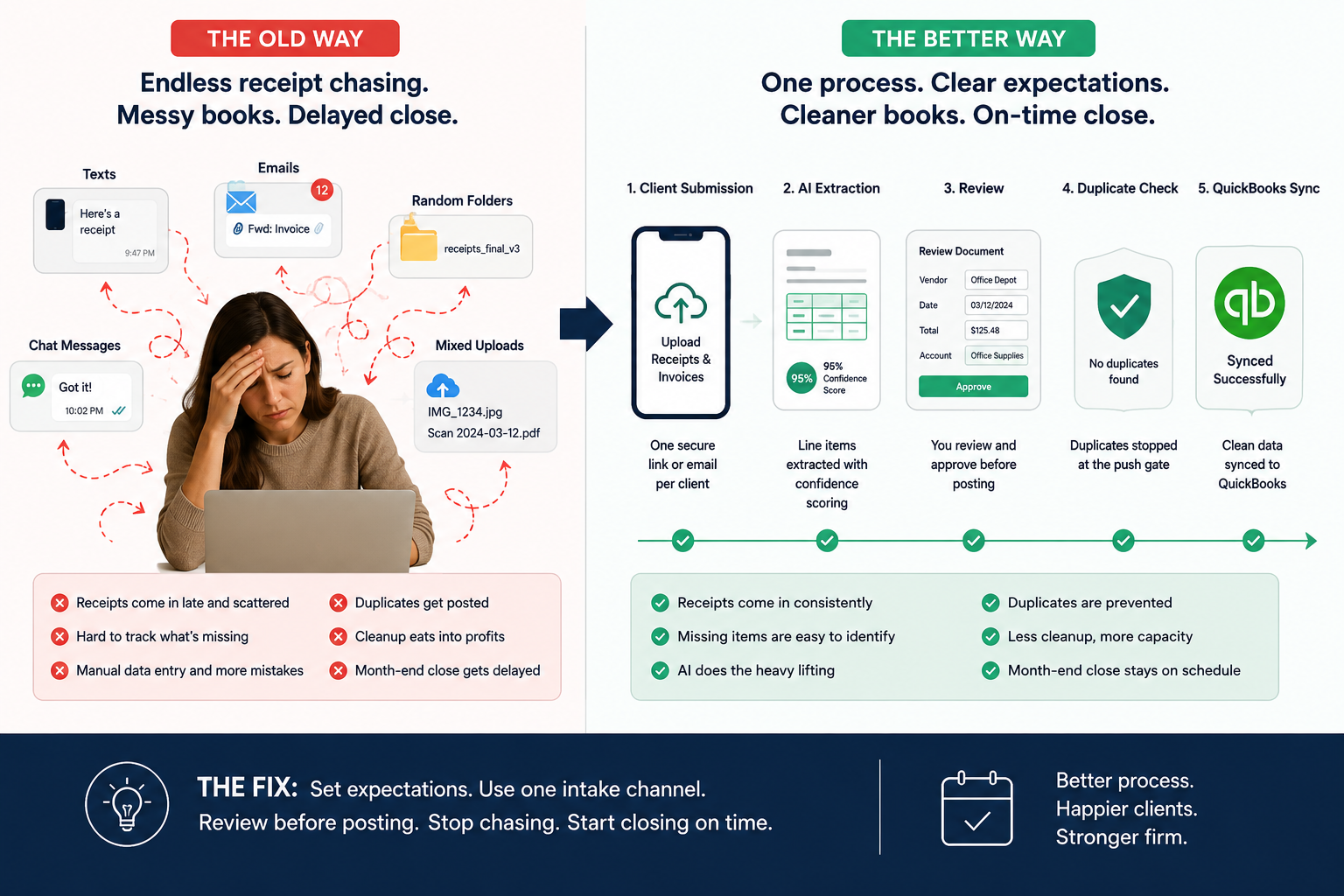
This is for bookkeepers and small CPA firms managing QuickBooks clients who send receipts late, scattered, or not at all. To stop chasing clients for receipts, you need two things: a clear receipt submission rule and one repeatable collection workflow. The fix is not "send more reminders." The fix is to make receipt collection part of your month-end process, with one intake channel, set deadlines, client-ready templates, and a review workflow before anything posts to QuickBooks.
If client documents are already slowing down your close, start by tightening your client document collection workflow. The goal is simple: less chasing, fewer cleanup surprises, and cleaner books before month-end.
Why Receipt Chasing Becomes a Bookkeeping Problem
Most receipt chasing starts small.
One client texts a gas receipt. Another forwards a vendor invoice to your personal email. Someone uploads a blurry restaurant receipt two weeks after the transaction cleared. Another waits until the 29th and sends a folder named "receipts."
That does not feel like a system. It feels like babysitting.
For bookkeepers, the real issue is not the receipt itself. It is the downstream mess:
- Uncategorized bank feed transactions
- Missing vendor names
- Bad memo fields
- Unclear split expenses
- Delayed reconciliations
- Owner's draws coded as expenses
- Duplicate receipts and bills
- Month-end close pushed back because the evidence is missing
You cannot fix that with one more "just checking in" email.
You need a receipt collection process that tells clients what to send, where to send it, when to send it, and what happens if they do not.
The Rule: Stop Asking One Receipt at a Time
Bookkeepers get stuck chasing because the process is transaction-by-transaction.
"Can you send the receipt for Home Depot?"
"Do you have the Amazon invoice from March 12?"
"What was this $486.22 charge?"
That creates a loop. You review transactions, find gaps, send questions, wait, follow up, then re-open the file later.
A better rule:
Clients should submit receipts continuously, and the bookkeeper should review exceptions on a set schedule.
That means you are not constantly reacting. You are running a close process.
Here is the difference.
| Old receipt-chasing workflow | Better receipt collection workflow |
|---|---|
| Ask for receipts after transactions hit the bank feed | Give clients one receipt submission channel upfront |
| Chase clients one missing item at a time | Send one organized exception list by deadline |
| Accept receipts by text, email, uploads, and random folders | Use one client-specific intake path |
| Review documents only at month-end | Review weekly or biweekly before close |
| Post quickly, then clean up later | Review, check confidence, detect duplicates, then sync |
| Rely on memory and inbox searching | Track missing items by client, month, and transaction |
This is why a receipt process matters more than a reminder template.
Templates help. But the system has to carry the work.
Set a Client Receipt Policy Before the Next Close
Most clients are not trying to make your job harder. They are busy. They do not know what counts as a receipt. They do not know when you need it. They do not know that a bank feed line is not enough.
Give them a short policy.
Use this in onboarding, renewal, or your next "new month, new process" email.
Client Receipt Policy Template
Hi [Client Name],
To keep your books accurate and close the month on time, please send receipts, invoices, and supporting documents as expenses happen.
Starting this month, please use this process:
- Send all receipts and invoices to [submission channel].
- Submit documents by [deadline] each month.
- Include receipts for meals, travel, supplies, equipment, contractors, software, and any unclear bank or credit card charges.
- If a receipt is missing, please add a short note explaining the expense.
- Any items not received by [final cutoff] may be categorized based on available information or moved to a question list for next month.
This helps us keep your QuickBooks file clean, avoid duplicate entries, and reduce month-end cleanup.
Thanks, [Your Name]
That language does three things.
It sets a deadline. It explains why the receipt matters. It gives you permission to stop chasing forever.
Use One Intake Channel Per Client
A client who can submit receipts five different ways will submit receipts five different ways.
That is why the first operational fix is intake control.
Pick one approved channel per client:
- A client-specific upload link
- A client-specific email address
- A shared folder with clear month folders
- A receipt capture workflow connected to QuickBooks
- A document collection tool built for bookkeeping firms
The key is not the tool alone. The key is that every client knows where documents go.
For QuickBooks-heavy firms, the intake process should eventually connect to posting. A receipt that lands in a folder still has to be read, coded, reviewed, checked for duplicates, and synced. That is why firms often outgrow basic file storage and look for a receipt-to-QuickBooks workflow instead of another place to store PDFs.
Send Fewer Nudges, but Make Them Better
You do not need more follow-ups. You need better follow-ups.
A good nudge is specific. It names the deadline. It tells the client what action to take. It avoids guilt. It protects your close.
Here are templates you can use.
Receipt Nudge Script #1: Early-Month Reminder
Subject: Receipts for [Month]
Hi [Client Name],
Please send receipts and invoices for [Month] as expenses come in. You can send them here: [submission link/email].
The most important items are meals, travel, supplies, equipment, contractors, software, and any charges that may not be obvious from the bank feed.
Please send what you have by [deadline] so we can keep your month-end close on track.
Thanks, [Your Name]
Receipt Nudge Script #2: Weekly Reminder
Subject: Weekly receipt check
Hi [Client Name],
Quick reminder to send any new receipts or invoices for this week.
Please use this link/email: [submission channel].
This helps us avoid a long receipt request list at month-end and keeps your QuickBooks file cleaner.
Thanks, [Your Name]
Receipt Nudge Script #3: Missing Receipt List
Subject: Missing receipts for [Month]
Hi [Client Name],
We are missing support for the items below:
Date Vendor / Description Amount What we need [Date] [Vendor] [$Amount] Receipt or invoice [Date] [Vendor] [$Amount] Business purpose [Date] [Vendor] [$Amount] Confirm category Please send the receipts or notes by [deadline]. If you do not have a receipt, a short explanation is fine.
Thanks, [Your Name]
Receipt Nudge Script #4: Final Close Cutoff
Subject: Final receipt cutoff for [Month]
Hi [Client Name],
We are closing [Month] on [date].
Please send any remaining receipts, invoices, or notes by [deadline]. Items not received by then may be categorized based on the information available or left on the open questions list.
This cutoff helps us close your books on time and avoid rework later.
Thanks, [Your Name]
Receipt Nudge Script #5: Firm Boundary Message
Subject: Receipt process update
Hi [Client Name],
To keep monthly bookkeeping on schedule, we are tightening our receipt process.
Going forward, receipts and invoices need to be submitted through [submission channel] by [deadline]. We will send one reminder and one missing item list before close.
After the cutoff, late documents may be handled in the next close cycle unless they affect a material transaction.
This will help us reduce cleanup, avoid duplicate work, and keep your QuickBooks file current.
Thanks, [Your Name]
This is not harsh. It is professional.
Clients respect a process when the process is clear.
Build Receipt Chasing into Your Month-End Close Checklist
Receipt collection should not sit outside your close process. It should be part of it.
Use a simple cadence:
| Timing | Bookkeeper action | Client action |
|---|---|---|
| Day 1–5 | Send monthly receipt reminder | Upload current receipts |
| Weekly | Review new documents and obvious gaps | Send receipts as expenses happen |
| 5 business days before close | Send missing receipt list | Reply with receipts or notes |
| 2 business days before close | Send final cutoff reminder | Submit final items |
| Close day | Review, code, dedupe, and sync | Answer only true exceptions |
| After close | Move late items to next cycle or cleanup list | Avoid last-minute dumping next month |
This turns receipt chasing into a repeatable close step.
It also gives you cleaner client conversations. You are no longer asking randomly. You are following the agreed process.
For firms that want a deeper close workflow, connect this article with your month-end close checklist for bookkeepers.
What to Do When Clients Still Do Not Send Receipts
Some clients will still miss the deadline.
That does not mean your process failed. It means you need a defined exception policy.
Use these rules:
1. Separate Missing Receipts from Unclear Transactions
A missing receipt is not always a blocker.
If the vendor, amount, and business purpose are obvious, you may be able to code the transaction and note that the receipt is missing.
An unclear transaction is different. If the business purpose, owner use, or category is unclear, keep it on the question list.
2. Use a Client-Facing Open Items List
Do not send ten separate emails.
Send one open items list. Include date, vendor, amount, and what you need.
Clients respond better when the work is grouped.
3. Do Not Reopen Closed Work for Every Late Receipt
Late receipts should not blow up your close process.
Set a rule: late documents are handled in the next cleanup cycle unless they affect a material item, tax-sensitive transaction, or reconciliation issue.
4. Track Repeat Offenders
If one client always sends receipts late, you may need a stronger boundary:
- Earlier deadline
- Higher cleanup fee
- Monthly receipt review meeting
- Required upload channel
- Engagement letter language
This is especially important if you manage 20, 50, or 100 QuickBooks clients. One messy client can distort your whole week.
Where ScribeosAI Fits in the Receipt Chasing Problem
ScribeosAI does not replace your judgment. It reduces the manual work around receipt collection, review, and QuickBooks posting.
The workflow is built for bookkeepers and small CPA firms that manage multiple QuickBooks clients:
Client document collection Clients send receipts and invoices through a controlled intake flow instead of random texts, inbox threads, and folders.
AI extraction with line items ScribeosAI extracts key receipt and invoice details, including line items, so you are not typing from PDFs and images all day.
Confidence scoring You can see what needs review instead of treating every document the same.
Human review before posting You review the extracted data before it syncs to QuickBooks. This keeps you in control of coding, vendors, categories, and client-specific rules.
Duplicate detection at the push gate Before posting, ScribeosAI checks for duplicates so you do not create cleanup work while trying to move faster.
QuickBooks sync Reviewed documents sync into QuickBooks after your review.
That matters because the real goal is not just getting receipts. The goal is getting clean, reviewed, non-duplicated data into QuickBooks with less manual entry.
If your firm is comparing tools, the QuickBooks receipt scanner page explains the core workflow, and the receipt scanner for bookkeepers page covers the multi-client firm use case.
Proof from Firms Using ScribeosAI
VNB Consulting reported a 90% reduction in manual data entry time with ScribeosAI.
Diya Hospitality is also a named customer.
The pattern is the same: when documents come in through a controlled workflow, and extraction, review, duplicate checks, and QuickBooks sync happen in one process, the firm spends less time typing and more time reviewing.
A Simple Receipt Process You Can Implement This Week
You do not need to rebuild your whole firm to stop chasing receipts.
Start here:
- Pick one submission channel per client.
- Send the receipt policy template.
- Set one monthly receipt deadline and one final cutoff.
- Use one missing receipt list instead of scattered emails.
- Add receipt review to your close checklist.
- Create an exception rule for late documents.
- Move from storage-only collection to a review-before-post workflow when volume gets too high.
That last step is where many firms change their process.
A folder can hold receipts. It cannot review them, extract line items, flag confidence issues, check duplicates, or sync clean data into QuickBooks.
That is the difference between storing client documents and running a bookkeeping workflow.
For tool evaluation, use the receipt scanner comparisons hub or review firm-specific alternatives like the Dext alternative and Hubdoc alternative pages.
FAQ
How do I get clients to send receipts on time?
Set one receipt submission channel, one monthly deadline, and one final cutoff. Send clients a short policy that explains what to send, where to send it, and what happens if documents arrive late. Do not chase one receipt at a time. Send one organized missing item list.
What is the best way to collect receipts from clients?
The best way is to use one client-specific intake channel and connect it to your bookkeeping workflow. For QuickBooks firms, receipt collection should support extraction, review, duplicate detection, and QuickBooks sync.
What should I say when asking a client for missing receipts?
Be specific. Include the transaction date, vendor, amount, and what you need. A short missing receipt table works better than a vague reminder.
How often should bookkeepers ask clients for receipts?
Ask at a set cadence. Weekly reminders work well for high-volume clients. For lower-volume clients, send an early-month reminder, a missing item list before close, and a final cutoff reminder.
Can I close the month without every receipt?
Sometimes. If the vendor, amount, and business purpose are clear, you may be able to code the transaction and note the missing support. If the transaction is unclear, tax-sensitive, or material, keep it on the open questions list.
How do I stop clients from texting receipts?
Give them one approved submission method and repeat it every time. Do not process receipts from random channels forever. Reply with: "Please send this through [submission channel] so it is captured in your monthly file."
What if a client always sends receipts late?
Create a boundary. Use earlier deadlines, a final cutoff, cleanup fees, or engagement letter language. Late receipts should not force you to reopen completed work every month.
How can ScribeosAI help with client receipt collection?
ScribeosAI gives bookkeeping firms a QuickBooks-first workflow for client document collection, AI extraction with line items, confidence scoring, human review, duplicate detection, and QuickBooks sync. It is built for firms managing multiple QuickBooks clients.