Comparison
DocuClipper Alternative
Last updated: July 2026
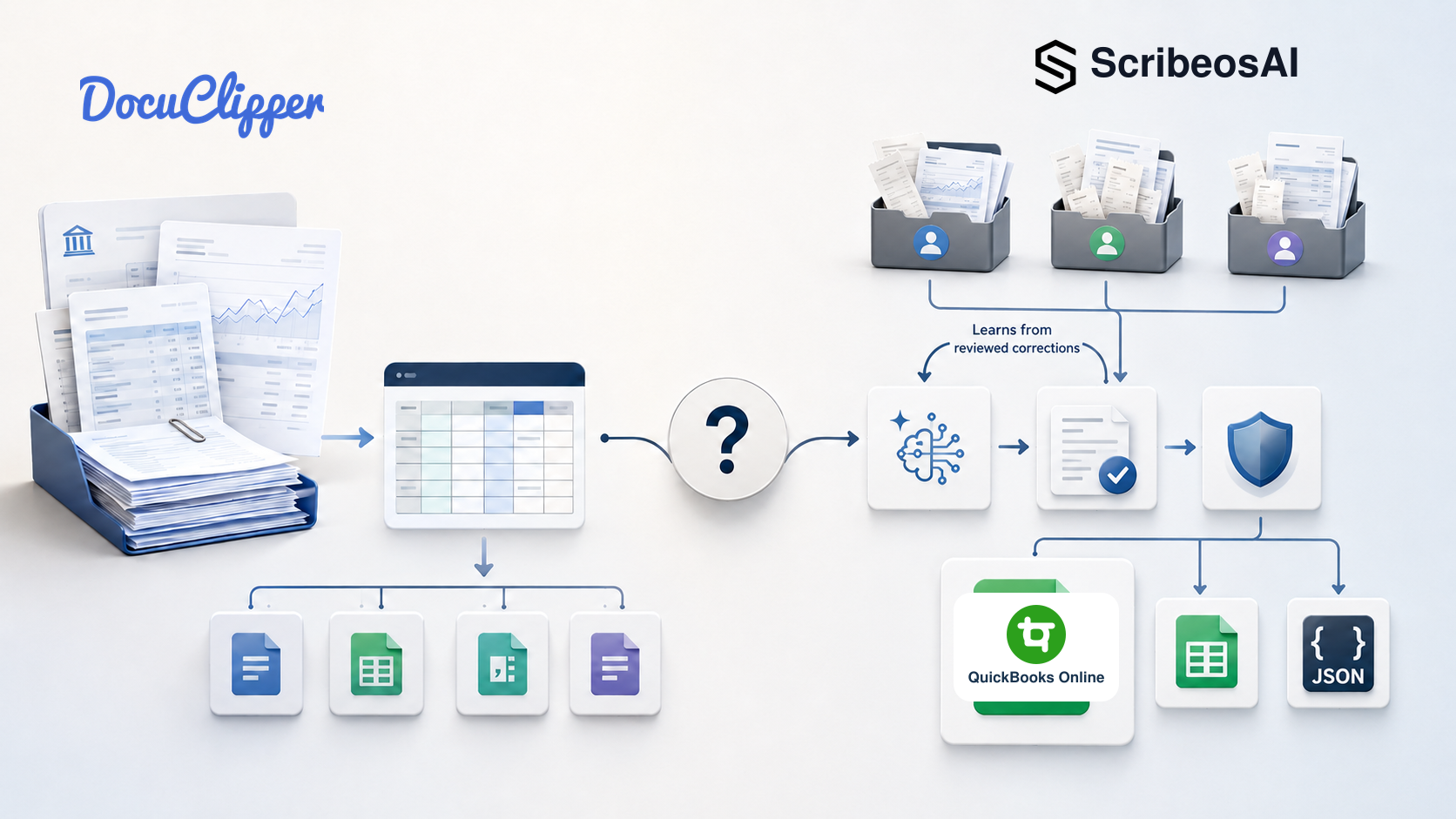
If you are a bookkeeper comparing DocuClipper alternatives, the decision is not simply about which product can read a PDF. Both DocuClipper and ScribeosAI extract structured data from financial documents.
The difference is the workflow around that extraction.
Quick verdict
Choose DocuClipper when bank-statement conversion, broad document support, multiple accounting platforms, reconciliation, or flexible exports drive the decision. Consider ScribeosAI when you manage multiple QuickBooks clients and want client intake, line-item extraction, confidence-based review, learned classification suggestions, duplicate protection, and approved QuickBooks posting in one workflow.
DocuClipper is a strong choice when your work centers on converting, reconciling, analyzing, or exporting many types of financial documents. ScribeosAI is a strong choice when your firm needs a QuickBooks-first workflow for collecting, classifying, reviewing, learning from corrections, checking duplicates, and posting client receipts and invoices.
If most of your clients use QuickBooks Online, examine the complete QuickBooks receipt workflow rather than comparing OCR accuracy alone.
DocuClipper vs ScribeosAI
| Decision factor | DocuClipper | ScribeosAI |
|---|---|---|
| Primary use case | Broad financial-document extraction, conversion, reconciliation, analysis, and export | QuickBooks-first receipt and invoice workflow for bookkeeping firms |
| Best fit | Accountants, bookkeepers, lenders, tax professionals, forensic teams, and technical workflows | Bookkeepers and small CPA firms managing multiple QuickBooks clients |
| Document coverage | Bank and credit-card statements, brokerage statements, invoices, receipts, checks, tax forms, and custom documents | Receipts, invoices, bills, vendor credits, and related bookkeeping documents |
| Accounting platforms | QuickBooks, Xero, Sage, NetSuite, Dynamics 365, and exports | QuickBooks Online is the live accounting integration |
| Bank-statement conversion | A core strength, with reconciliation and multiple formats | Not the primary ScribeosAI use case |
| Line-item extraction | Available for invoices and receipts | Included in the receipt and invoice workflow |
| Classification | Transaction categorization using rules and AI | System classification plus learned suggestions from reviewed corrections |
| Human review | Review and editing are supported | Review-before-post is a central control |
| Duplicate protection | Confirm how controls apply to your exact workflow | Duplicate detection runs at the QuickBooks push gate |
| Multi-client operation | Accounting-firm workflows and unlimited users | Separate client workspaces and intake emails; unlimited clients on paid plans |
| Outputs | Excel, CSV, QBO, IIF, OFX, QFX, QIF, integrations, and APIs | QuickBooks Online sync plus Excel-compatible and JSON outputs |
| Free entry point | 14-day trial with up to 120 processed pages; upgrade required to export or sync | 50 free pages with no credit card required |
Product capabilities and pricing can change. Verify current plan details with each provider before purchasing. DocuClipper information on this page was checked against its official website on July 25, 2026.
The practical workflow difference
Feature lists can hide the operational difference. Follow one document from arrival to completion.
DocuClipper workflow
Financial document → extraction → reconciliation or review → conversion or export → accounting platform, spreadsheet, or downstream system
This works well when the document itself is the center of the job. A PDF bank statement may need to become a QBO file. A brokerage statement may need structured rows. A technical team may need API output.
ScribeosAI workflow
Client document collection → intelligent classification → line-item extraction → confidence scoring → human review → learned correction → duplicate detection → QuickBooks Online, Excel, or JSON
This workflow starts with the client relationship. Each client can have a dedicated intake route. Documents stay separated by client and organized for review. ScribeosAI classifies the document and extracts fields and line items. The bookkeeper reviews uncertain values and corrects classifications when necessary. Those reviewed corrections improve future suggestions. Duplicate protection runs before the approved transaction reaches QuickBooks.
Bookkeeping automation should not remove professional judgment. It should place judgment where it prevents rework. See how this fits into QuickBooks document management.
When DocuClipper is the better choice
DocuClipper may be the better choice when your work extends beyond a recurring QuickBooks receipt and invoice queue.
Choose DocuClipper when:
- • Bank and credit-card statement conversion is a major workload.
- • You need reconciliation checks tied to statement extraction.
- • Your firm supports several accounting platforms.
- • You need QBO, IIF, OFX, QFX, QIF, Excel, or CSV exports.
- • You process brokerage statements, checks, W-2s, 1099s, or other tax documents.
- • You need cash-flow analysis, fraud signals, or forensic-accounting capabilities.
- • Your technical team wants APIs, webhooks, custom parsers, or embedded extraction.
DocuClipper also publishes enterprise security features, including SOC 2 Type II certification and additional controls on applicable plans. Firms with specialized compliance requirements should compare those controls directly.
Those are real advantages. This page should not pretend otherwise.
When ScribeosAI is the better fit
ScribeosAI is the better fit when your firm is QuickBooks-first and the bottleneck is recurring client document processing.
Choose ScribeosAI when:
- • You manage multiple QuickBooks Online clients.
- • Each client needs a consistent way to submit receipts and invoices.
- • You need line-item detail, not only vendor, date, and total.
- • Reviewers need confidence signals before approval.
- • You want the system to learn from reviewed classification corrections.
- • Nothing should post without bookkeeper review.
- • Duplicate documents create month-end cleanup.
- • You want QuickBooks as the primary destination, with Excel and JSON available.
- • You want to add clients without adding a separate software fee for each one.
The advantage is not that ScribeosAI offers more conversion formats. DocuClipper does.
The advantage is focus: ScribeosAI is designed around the controlled path from messy client documents to reviewed QuickBooks entries. Unlimited clients on paid plans also let a firm standardize one process without deciding which clients justify another software charge. Learn more about receipt scanning with unlimited clients.
Compare the full cost, not only the page price
Both products use page volume as an important pricing variable. Test each at your real monthly volume.
As of July 25, 2026, DocuClipper's annual-billing examples included 60 pages for $20 per month, 640 pages for $111 per month, and 2,000 pages for $360 per month. DocuClipper includes unlimited users and pools pages across the account.
ScribeosAI uses flat, page-based pricing with unlimited clients. Check the live ScribeosAI pricing page before publishing or purchasing.
For each product, calculate:
- Normal monthly pages and seasonal spikes.
- Document types processed.
- Need for bank-statement reconciliation.
- Need for accounting platforms beyond QuickBooks.
- Reviewer time after extraction.
- Time spent organizing documents by client.
- Duplicate cleanup after posting.
The useful metric is cost per completed, reviewed bookkeeping transaction, not cost per extracted page.
What bookkeepers should test before switching
Do not switch based on a feature grid. Run a controlled trial with one or two representative clients.
Use the same batch in both products:
- • A clean PDF invoice.
- • A photographed receipt.
- • A multi-page or multi-line document.
- • A document with an ambiguous classification.
- • A duplicate of a previously submitted document.
- • A bank statement, if statement conversion matters.
Measure:
- • Time from client intake to the correct client queue.
- • Header and line-item extraction accuracy.
- • Visibility of low-confidence fields.
- • Time required to review and correct the document.
- • Whether reviewed corrections improve later suggestions.
- • Duplicate protection before posting.
- • Vendor, customer, account, class, and item mapping.
- • Batch-review efficiency.
- • Accuracy of QuickBooks, Excel, JSON, or other required outputs.
- • Total staff minutes from receipt to completed bookkeeping entry.
Use actual staff time. The strongest extraction result is not always the strongest bookkeeping result.
Do not cancel your current product first. Run both workflows in parallel. A narrow pilot will show whether the alternative reduces review time and month-end cleanup without disrupting clients.
Proof from a working bookkeeping environment
VNB Consulting reduced manual data-entry time by nearly 90% using ScribeosAI.
That result is not a guarantee for every firm. It demonstrates the problem ScribeosAI is built to solve: repetitive document entry inside a real accounting workflow.
Read the VNB Consulting case study for context.
The bottom line
Choose DocuClipper when your primary need is broad financial-document conversion, bank-statement reconciliation, financial analysis, multiple accounting platforms, custom automation, or many export formats.
Consider ScribeosAI when your firm is QuickBooks-first and needs a repeatable process for collecting, classifying, extracting, reviewing, learning from corrections, checking duplicates, and posting receipts and invoices across multiple clients.
The best test is not a polished demo. It is one week of real client documents.
Frequently asked questions
- What is the best DocuClipper alternative for QuickBooks bookkeepers?
- ScribeosAI is a strong option for QuickBooks-focused firms that need client intake, line-item extraction, learned suggestions, human review, duplicate protection, and approved QuickBooks posting. DocuClipper may be better when bank statements, broad conversion, multiple ledgers, or flexible exports are the priority.
- How is ScribeosAI different from DocuClipper?
- DocuClipper is a broad financial-document extraction, reconciliation, analysis, and export platform. ScribeosAI is a QuickBooks-first receipt and invoice workflow organized around multiple clients, review before posting, learned corrections, and duplicate detection.
- Is DocuClipper better for bank statements?
- Yes. If bank-statement conversion and reconciliation are central requirements, DocuClipper is likely the better fit.
- Does DocuClipper work with QuickBooks?
- Yes. DocuClipper supports QuickBooks Online and Desktop workflows and provides QBO and IIF export options.
- Does ScribeosAI support Excel and JSON?
- Yes. ScribeosAI provides spreadsheet-compatible and structured JSON outputs in addition to its primary QuickBooks Online workflow.
- Does ScribeosAI learn from bookkeeper corrections?
- Yes. Reviewed corrections improve future classification suggestions. The bookkeeper remains in control and reviews transactions before posting.
Ready to test a DocuClipper alternative?
Start with 50 free pages. No credit card required.