Last updated: July 2026
Expensify Alternative for Bookkeepers
If you are a bookkeeper managing multiple QuickBooks clients, Expensify may not be the best fit if your real problem is client receipt collection, invoice extraction, review, duplicate checks, and clean QuickBooks posting. Expensify is strong for employee expense reports, approvals, reimbursements, cards, and spend management. A bookkeeping firm needs a workflow built around many clients, messy document intake, line-item review, and month-end close.
That is the difference. If you are comparing tools for a firm workflow, start with the receipt scanner comparison hub or use this page to decide whether ScribeosAI is a better Expensify alternative for bookkeepers.
Quick answer: when should bookkeepers look beyond Expensify?
Look beyond Expensify when your firm is not managing employee reimbursements.
Look beyond it when your problem sounds like this:
A client sends receipts late. Another sends five screenshots. Another emails invoices without context. Your team has to sort documents by client, read line items, check the chart of accounts, avoid duplicate posting, and push clean entries into QuickBooks.
That is not just expense reporting. That is bookkeeping operations.
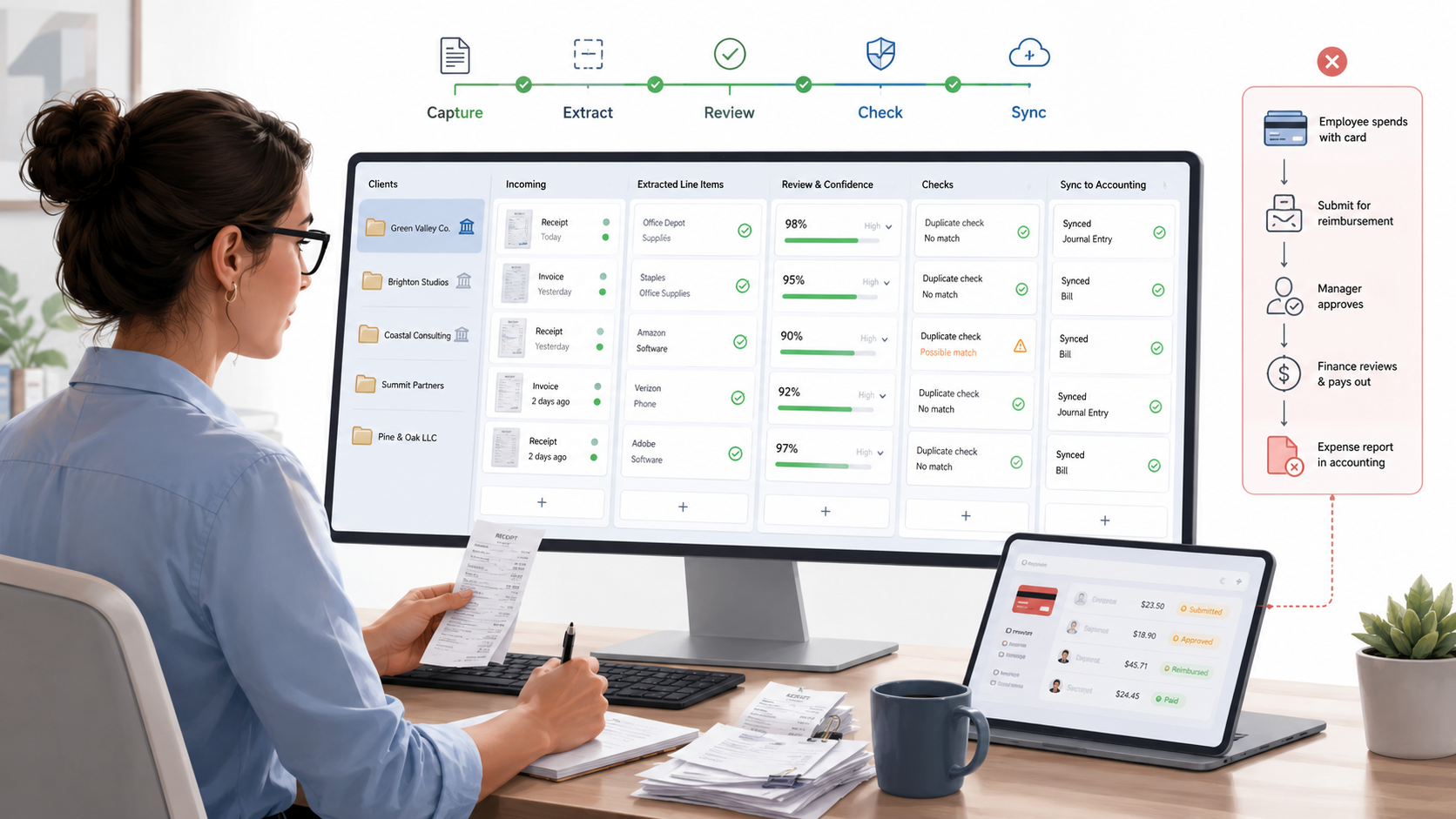
ScribeosAI is built for that workflow: client document collection → AI extraction with line items and confidence scoring → human review → duplicate detection → QuickBooks sync.
Expensify vs ScribeosAI for bookkeeping firms
| Category | Expensify | ScribeosAI |
|---|---|---|
| Best fit | Companies managing employee expenses, approvals, reimbursements, cards, and spend controls | Bookkeepers and small CPA firms managing receipts and invoices for multiple QuickBooks clients |
| Primary workflow | Employee submits expense → manager approves → reimbursement/card/report sync | Client sends document → AI extracts data → bookkeeper reviews → duplicate check → QuickBooks sync |
| Buyer | Business owner, finance team, operations team, employee expense admin | Bookkeeper, firm owner, small CPA firm |
| Client management | Not the core reason to buy | Built around multi-client bookkeeping work |
| QuickBooks fit | Useful for syncing expense reports, card transactions, and reimbursements | QuickBooks-first receipt and invoice workflow |
| Line-item extraction | Check fit by plan and use case | Included |
| Review before posting | Useful in expense approval workflows | Core workflow before QuickBooks sync |
| Duplicate detection | Helpful for expense management controls | Built into the push gate before QuickBooks sync |
| Pricing concern | Per-member pricing can make sense for employee teams | Flat pricing with unlimited clients and no per-client fees |
| Best decision rule | Choose it for employee spend management | Choose ScribeosAI for client receipt and invoice automation |
Why Expensify may feel wrong for bookkeepers
Expensify is a strong product when the job is employee expense management.
That job usually looks like this:
- An employee spends money.
- They submit a receipt.
- A manager approves it.
- Finance reimburses it or reconciles it.
- The expense report syncs to accounting.
That workflow makes sense for companies with employees, card programs, travel, reimbursements, and approval policies.
But bookkeepers often have a different job. Your client is not your employee. You are not approving their travel reimbursement. You are trying to turn messy source documents into clean QuickBooks entries.
That difference matters.
Where ScribeosAI fits instead
ScribeosAI is not trying to replace every spend management feature in Expensify. It is built for QuickBooks-first receipt and invoice automation.
Use ScribeosAI when your firm needs a practical workflow for:
- Collecting client receipts and invoices
- Sorting documents by client
- Extracting receipt and invoice data
- Reviewing line items before posting
- Checking confidence scores
- Catching duplicates before QuickBooks sync
- Reducing manual entry during month-end close
For a deeper workflow view, read the QuickBooks receipt scanner guide or the receipt scanner for bookkeepers page.
When Expensify is the better choice
Expensify may be the better choice if your client or company needs expense management, not bookkeeping document automation.
Choose Expensify if:
- Employees need to submit expense reports
- Managers need approval workflows
- The company needs reimbursement handling
- Corporate card management is central
- Travel and spend controls are part of the process
- The finance team wants employee expense reports synced to accounting
- The business is managing its own expenses, not a firm managing many client books
That is a valid use case. ScribeosAI is not the better answer for every Expensify user. If your main problem is employee spend control, Expensify may fit better.
How to evaluate an Expensify alternative for bookkeepers
Use this checklist before choosing any tool:
1. Does it match your actual workflow?
Map the full workflow first. Where do documents come from? Who sends them? How are they sorted by client? Who reviews extracted data? What happens before QuickBooks sync? Where do duplicates get caught?
2. Does it support multiple clients without pricing friction?
ScribeosAI uses flat pricing with unlimited clients and no per-client fees. That matters when you are managing a growing client base and want predictable margins.
3. Does line-item extraction cost extra or come included?
You may need line items for job costing, split expenses, tax treatment, inventory purchases, reimbursements, or client-specific coding rules. ScribeosAI includes line-item extraction.
4. Does the bookkeeper review before posting?
Automation should remove typing, not remove judgment. ScribeosAI keeps human review before the QuickBooks push.
5. Does it catch duplicates before QuickBooks?
ScribeosAI includes duplicate detection at the push gate. This prevents cleanup work later.
Proof: what this looks like in real bookkeeping work
VNB Consulting reduced manual data entry time by nearly 90% using ScribeosAI.
That is the point of the product. Not to add another inbox. Not to create another place to review the same documents. Not to make your team manage a tool built for a different buyer.
The goal is simple: collect client documents, extract the details, review what matters, prevent duplicates, and sync clean data into QuickBooks.
Diya Hospitality is also a named ScribeosAI customer.
Practical recommendation
Choose Expensify if the job is employee expense management.
Choose ScribeosAI if the job is bookkeeping document automation for QuickBooks clients.
The distinction is important. A business owner searching for "Expensify alternative" may need spend management. A bookkeeper searching for "Expensify alternative for bookkeepers" likely needs a better way to collect, review, and post client receipts and invoices.
For related comparisons, see Dext alternative, Hubdoc alternative, and Dext vs Hubdoc.
Frequently asked questions
What is the best Expensify alternative for bookkeepers?
The best Expensify alternative for bookkeepers is a tool built around client receipt collection, invoice extraction, review, duplicate detection, and QuickBooks sync. ScribeosAI is a strong fit for QuickBooks-first bookkeepers because it includes line-item extraction, review before posting, flat pricing, unlimited clients, and 50 free pages with no card required.
Is Expensify good for bookkeepers?
Expensify can be useful when a bookkeeper supports clients with employee expense reports, reimbursements, cards, and spend approvals. It may be less ideal when the firm's main need is collecting client receipts and invoices, reviewing extracted data, and posting clean entries into QuickBooks.
Is Expensify better than ScribeosAI?
Expensify is better for employee expense management. ScribeosAI is better for QuickBooks-first bookkeepers who need receipt and invoice automation across multiple clients. The right choice depends on whether you are managing employee spend or bookkeeping document flow.
Does ScribeosAI replace Expensify?
ScribeosAI can replace Expensify only when your use case is receipt and invoice automation for bookkeeping. It is not a full replacement for employee expense reports, reimbursements, corporate cards, travel workflows, or spend controls.
What should bookkeepers look for in an Expensify alternative?
Bookkeepers should look for multi-client document collection, QuickBooks sync, line-item extraction, confidence scoring, review before posting, duplicate detection, and predictable pricing. The tool should reduce month-end work, not just capture receipts.
Is there an Expensify alternative with unlimited clients?
Yes. ScribeosAI uses flat pricing with unlimited clients and no per-client fees. That can fit bookkeeping firms that manage many QuickBooks clients and want predictable software costs as they grow.
Can ScribeosAI sync receipts to QuickBooks?
Yes. ScribeosAI is built for QuickBooks-first receipt and invoice automation. The workflow collects client documents, extracts data, supports human review, checks duplicates, and syncs clean entries to QuickBooks.
Who should not use ScribeosAI instead of Expensify?
Do not choose ScribeosAI as an Expensify alternative if your main need is employee expense reports, corporate card management, travel booking, reimbursements, or spend approval workflows. Expensify is more aligned to those needs.
Ready to try ScribeosAI?
50 free pages. No card required. QuickBooks-first workflow.