Month-End Close Automation
Month-end close automation is for bookkeeping firms that manage multiple QuickBooks clients and lose days chasing receipts, keying bills, cleaning up duplicates, and posting late transactions. The goal is not to remove review. The goal is to remove the repeatable work before review.
For QuickBooks bookkeepers, the best month-end close automation collects client documents, extracts receipt and invoice details, flags low-confidence fields, prevents duplicate postings, and syncs reviewed transactions to QuickBooks.
If your current close process still depends on a manual month-end close checklist for bookkeepers, that checklist is still useful. But the checklist should not be the system. It should sit on top of a workflow that keeps documents moving before close week starts.
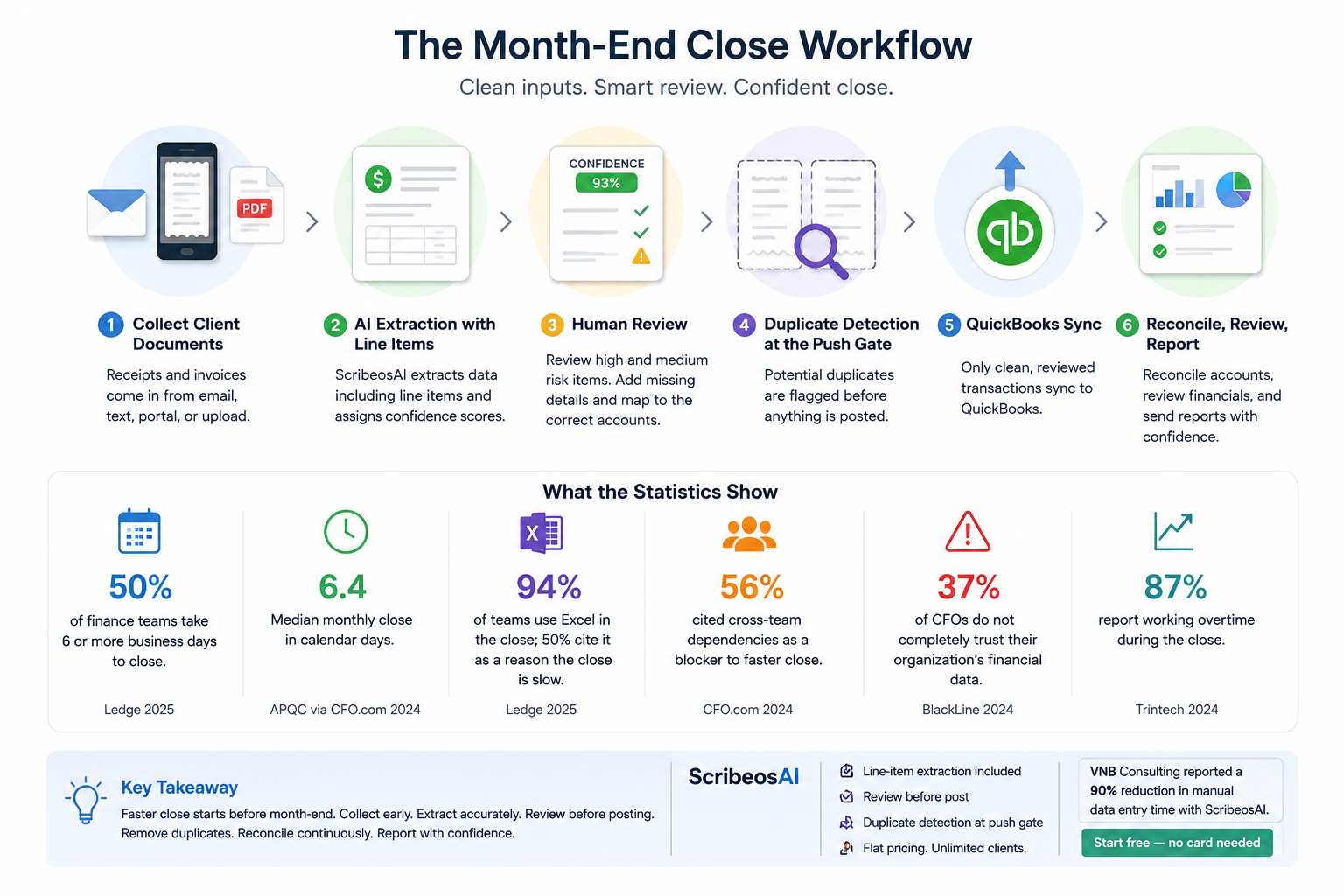
ScribeosAI helps bookkeeping firms build that workflow: client document collection, AI extraction with line items and confidence scoring, human review, duplicate detection, and QuickBooks sync after approval.
What Month-End Close Automation Should Actually Automate
Month-end close is not one task. It is a chain of small tasks that depend on clients, documents, categorization, timing, and review.
Good automation does not try to "close the books" without the bookkeeper. That creates cleanup risk.
Good automation removes the repetitive document work so the bookkeeper can focus on judgment: coding, exceptions, reconciliations, review, and advisory notes.
| Close step | Manual problem | What to automate | What should stay human |
|---|---|---|---|
| Client document collection | Receipts and invoices arrive through email, text, portals, and late follow-ups | Centralize document intake by client | Client communication rules and escalation |
| Receipt and invoice entry | Staff retype vendor, date, amount, tax, memo, and line items | Extract fields and line items from documents | Review uncertain fields and coding logic |
| Close prep | Missing documents are discovered too late | Track what has arrived before close week | Decide whether to accrue, request, or exclude |
| Duplicate control | Same receipt is uploaded twice or posted twice | Detect duplicates before QuickBooks sync | Confirm edge cases |
| QuickBooks posting | Transactions are pushed before review | Sync only approved records | Final posting judgment |
| Cleanup | COA issues and miscoding slow reconciliation | Reduce bad inputs upstream | COA cleanup, reconciliations, and reporting |
That is the practical definition of month-end close automation: fewer late documents, less retyping, cleaner review, fewer duplicate postings, and faster QuickBooks updates.
Why Month-End Close Breaks Down for Bookkeeping Firms
The close usually breaks down before reconciliation.
A client sends half the receipts. Someone forwards invoices to the wrong inbox. A staff member enters bills from PDFs by hand. Another person posts a receipt that was already captured from a bank feed. The bookkeeper finds the issue during close and has to clean it up under deadline.
That is why many firms feel busy even when the work is repeatable.
The issue is not the checklist. The issue is that the inputs are messy.
A strong client document collection workflow fixes the first problem. It gives each client a consistent way to send receipts and invoices. It also makes it easier to see what has arrived, what needs review, and what still has to be chased.
The Month-End Close Automation Workflow for QuickBooks Firms
Use this workflow when you manage 5, 20, 50, or 100 QuickBooks clients.
1. Standardize How Clients Submit Documents
Do not let every client invent their own intake process.
Pick a standard process for receipts, invoices, bills, and backup documents. Make it clear what clients should send, where they should send it, and when they should send it.
At a minimum, define:
- Which documents clients must submit monthly
- The cut-off date for each close
- The channel they should use
- What happens when something is missing
- Who on your team owns follow-up
This matters because automation cannot fix documents that never arrive.
2. Extract Receipt and Invoice Data Before Close Week
Manual data entry is one of the easiest close tasks to reduce.
A QuickBooks receipt scanner can help, but the scanner has to fit a bookkeeping firm workflow. For firms, the need is not just "scan a receipt." The need is to process receipts and invoices across many clients without charging per client or forcing every client into a separate manual process.
Useful extraction should capture:
- Vendor
- Date
- Amount
- Tax
- Memo or description
- Line items
- Confidence score
- Client assignment
- Document type
Line-item extraction matters because many close issues live below the header total. A restaurant invoice, hotel bill, supply order, or multi-category vendor receipt may need more than one line of detail. ScribeosAI includes line-item extraction so the review starts with the detail visible, not buried in the PDF.
3. Review Exceptions Instead of Retyping Every Field
Automation should not post straight to QuickBooks without a review step.
For bookkeepers, review-before-post is safer. Your team should see extracted fields, confidence scores, and the source document before approving a transaction.
A good review queue should help your team answer:
- Is the vendor correct?
- Is the date inside the right close period?
- Is the amount right?
- Are the line items usable?
- Does the transaction belong to this client?
- Is there a possible duplicate?
- Is the coding ready for QuickBooks?
This is where human review protects quality without keeping the entire process manual.
4. Stop Duplicates Before They Hit QuickBooks
Duplicate receipts create close drag.
They can come from clients uploading the same receipt twice, forwarding a receipt and invoice for the same purchase, or sending documents after a staff member already entered the transaction manually.
The best place to catch duplicates is before posting, not after reconciliation.
That is why ScribeosAI uses duplicate detection at the push gate. The system checks for potential duplicates before reviewed transactions sync to QuickBooks. For a deeper process guide, see how to avoid duplicate receipts in QuickBooks.
5. Sync to QuickBooks After Approval
QuickBooks sync should be the last step, not the first step.
Once a transaction is collected, extracted, reviewed, and cleared for duplicates, it can sync to QuickBooks. That keeps the books cleaner and reduces cleanup during close.
This is also where firm workflow matters. A solo business owner might accept faster posting with less review. A bookkeeper managing many clients usually needs more control.
That is the difference between receipt capture and close automation. Receipt capture gets the document into the system. Close automation helps the document become a reviewed QuickBooks transaction. See receipt to QuickBooks for the full document-to-posting workflow.
What Month-End Close Automation Will Not Fix
Automation helps most when the process is already defined.
It will not fix every close problem by itself. You still need clean rules for:
- Chart of accounts structure
- Client-specific coding policies
- Bank feed matching
- Reconciliation timing
- Cut-off dates
- Owner draws and reimbursements
- Accrual decisions
- Review notes and client questions
If every client has a different close process, start by standardizing the workflow. Then automate the repetitive parts.
If the COA is messy, clean the COA. If the client sends documents late, tighten the intake process. If staff post transactions without review, add a review gate. Automation works best when it supports firm discipline.
Where ScribeosAI Fits in the Close
ScribeosAI is built for bookkeepers and small CPA firms that use QuickBooks and manage recurring client document work.
The workflow is simple:
- Clients send receipts and invoices.
- ScribeosAI collects documents by client.
- AI extracts the receipt or invoice details, including line items.
- Confidence scoring helps your team find fields that need attention.
- Your team reviews before posting.
- Duplicate detection runs before the QuickBooks sync.
- Approved transactions sync to QuickBooks.
This gives your firm a cleaner pre-close workflow. It reduces retyping, late document chaos, and duplicate cleanup.
It also supports the pricing model firms need. ScribeosAI uses flat pricing with unlimited clients and no per-client fees. That matters when you manage 20, 50, or 100 QuickBooks clients and do not want software cost to rise every time you add a client. See the full pricing-model angle here: receipt scanner with unlimited clients.
Proof: Less Manual Entry, Cleaner Close Work
VNB Consulting reduced manual data entry time by nearly 90% with ScribeosAI.
That is the kind of close improvement that matters to bookkeeping firms. Not another dashboard. Not another place to store PDFs. Less typing. More review. Cleaner QuickBooks posting.
Diya Hospitality is also a named ScribeosAI customer, with a hospitality use case where receipt and invoice volume can create heavy document work.
Ready to automate your pre-close workflow?
ScribeosAI gives QuickBooks bookkeepers client document collection, AI extraction with line items, confidence scoring, human review, duplicate detection, and QuickBooks sync.
Start free — no card neededHow to Roll Out Month-End Close Automation Without Disrupting Clients
Do not roll this out across every client on day one. Start with a controlled pilot.
Week 1: Choose 3–5 Clients
Pick clients with predictable receipt and invoice volume. Avoid your messiest client for the first test. You want to prove the workflow before adding edge cases.
Good pilot clients usually have:
- Monthly receipt volume
- Recurring vendor invoices
- QuickBooks already in use
- A responsive client contact
- A close process your team understands
Week 2: Define the Intake Rules
Tell clients exactly how to send documents. Use plain instructions:
"Send receipts and invoices as they come in. Do not wait until month-end. We review documents before they are posted to QuickBooks."
This keeps the workflow practical and reduces the end-of-month rush. For client follow-up scripts, see how to stop chasing clients for receipts.
Week 3: Review Extracted Documents Daily or Twice Weekly
Do not let the review queue become a new month-end pile. Review documents during the month. This keeps errors visible earlier and gives clients more time to respond.
Your team should focus on:
- Low-confidence fields
- Missing vendors
- Wrong dates
- Unclear line items
- Potential duplicates
- Client-specific coding issues
Week 4: Compare the Close
At month-end, compare the pilot clients against your normal process. Track simple numbers:
- How many receipts were collected before close week?
- How many transactions needed manual entry?
- How many duplicate issues were caught before posting?
- How many client follow-ups were needed?
- How long did close prep take?
You do not need a complicated ROI model. You need to see whether your team spent less time chasing, typing, and cleaning up. For broader automation benchmarks, see bookkeeping automation statistics.
Month-End Close Automation Checklist
Before you choose a workflow, make sure it covers the real close bottlenecks.
- ☐Can clients send receipts and invoices through a consistent process?
- ☐Can the system organize documents by client?
- ☐Does it extract line items, not just totals?
- ☐Does it show confidence scores for review?
- ☐Can your team review before anything posts?
- ☐Does it check for duplicates before QuickBooks sync?
- ☐Does it support multiple QuickBooks clients without per-client fees?
- ☐Does it reduce close prep, not just document storage?
If the answer is no, you may be buying another inbox.
If the answer is yes, you are closer to a real month-end close automation workflow.
FAQ: Month-End Close Automation
What is month-end close automation?
Month-end close automation is the use of software to reduce repetitive close work such as collecting documents, extracting receipt and invoice data, reviewing exceptions, checking for duplicates, and syncing approved transactions to QuickBooks.
How do you automate month-end close in QuickBooks?
Start by standardizing client document collection. Then use automation to extract receipt and invoice data, review transactions before posting, detect duplicates, and sync approved records to QuickBooks.
Can month-end close be fully automated?
Not safely for most bookkeeping firms. The repetitive work can be automated, but bookkeepers still need to review coding, exceptions, reconciliations, accruals, and client-specific issues.
What is the best month-end close software for bookkeepers?
The best fit for QuickBooks bookkeepers is software that supports client document collection, receipt and invoice extraction, line-item detail, human review, duplicate detection, and QuickBooks sync.
How does automation reduce month-end close time?
It reduces the time spent chasing documents, retyping receipt and invoice data, fixing duplicates, and preparing transactions for QuickBooks. The bookkeeper still reviews the work, but starts from extracted data instead of blank entry screens.
Is month-end close automation worth it for small bookkeeping firms?
Yes, if the firm manages recurring QuickBooks clients and spends meaningful time on receipt collection, invoice entry, duplicate cleanup, and close prep. Flat pricing matters because per-client fees can punish firm growth.
Does ScribeosAI post directly to QuickBooks?
ScribeosAI uses a review-before-post workflow. Your team reviews extracted data and potential duplicates before approved transactions sync to QuickBooks.
Can ScribeosAI handle multiple clients?
Yes. ScribeosAI is built for bookkeepers and small CPA firms, with flat pricing, unlimited clients, and no per-client fees.
Close Faster Without Turning Review Into Risk
Month-end close automation should not remove the bookkeeper from the process.
It should remove the repetitive work that keeps the bookkeeper buried: chasing documents, typing receipt details, checking the same fields, and finding duplicates after posting.
ScribeosAI gives QuickBooks-first firms a cleaner path from client document collection to reviewed QuickBooks sync.